User mode
Client modes
The fflogsapi client can be used in two different modes - client mode and user mode.
The default mode of the client is client mode, which uses the public API. If you want to access
private information, however, you must use the client in user mode.
Examples of such information can be your own reports or character information if you have set visibility to private.
Setting up your API client for user mode
To use user mode, you must specify https://localhost:4433 as one of your redirect URLs in your API
client on FF Logs.
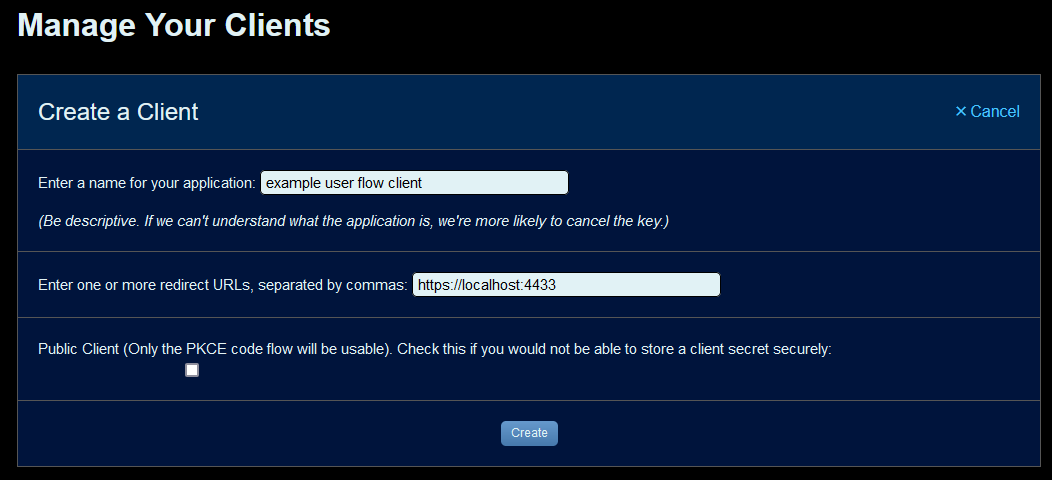
When instantiating the client, provide the mode='user' kwarg:
client = FFLogsClient(CLIENT_ID, CLIENT_SECRET, mode='user')
Differences to client mode
In user mode, the fflogsapi client will popup a browser window to allow the user to login and provide access once the first query to the API is made.
Note
The client will generate a self-signed certificate to serve the redirect. Your browser will likely produce a warning about this, although it is safe to ignore.
Custom authentication flows
If you wish to handle the user authentication flow yourself, you can still use the API client in user mode by calling set_auth_response to manually set the auth response. This must be done after instantiation, but before the first API query is made.
# Your implementation of the user authentication flow here
...

client = FFLogsClient(CLIENT_ID, CLIENT_SECRET, mode='user')
client.set_auth_response(response)

# Start using the client
...